
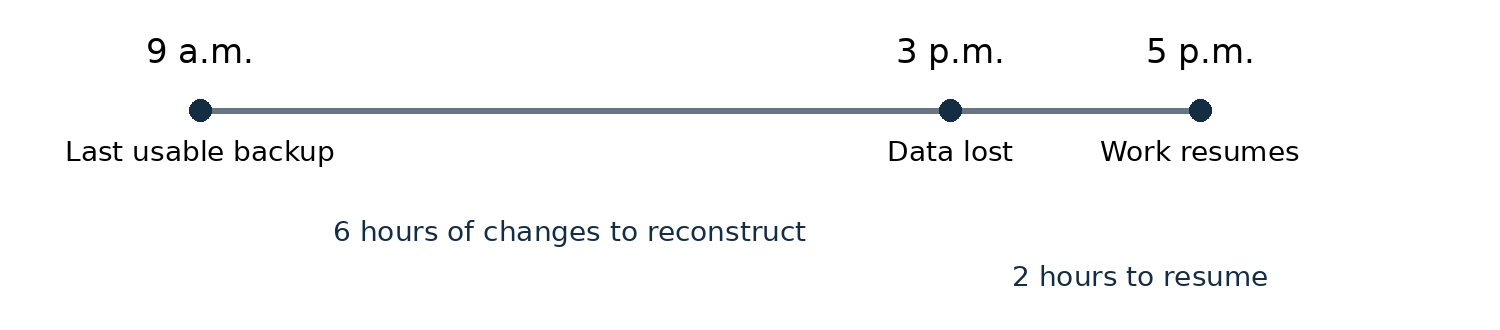
9 a.m. usable backup → 3 p.m. data loss → 5 p.m. work resumes.
Six hours of changes to reconstruct; two hours of interruption.
Illustrative scenario only. Actual recovery depends on the usable backup and the work needed to resume.
Open full-size timeline ↗Think about the work your team did today: invoices sent, appointments booked, customer details updated, project files revised. If those records disappeared this afternoon, how much could you recreate? How much would depend on someone remembering what happened?
That is a useful place to start a backup conversation. The answer affects the backup schedule, the copies you keep and the recovery plan you write down.
Two questions to answer
First, how much recent work could you afford to lose? Your last usable restore point determines how far back your recovered data goes. A backup from 9 a.m. cannot contain changes made at noon. The target you set for acceptable lost work is often called a recovery point objective. [3]
Second, how long could you operate without that information? Getting a copy back may involve finding a clean computer, regaining account access, reinstalling software and checking the restored records. Set a recovery-time target separately. [4]
In the fictional example above, data is lost at 3 p.m. and work resumes at 5 p.m. using a 9 a.m. backup. That means six hours of changes may need reconstructing, even though the interruption lasted two hours. Your business may tolerate one of those numbers and struggle with the other.

Open full-size image ↗ · Download image

Check what your copies can survive
Read the comic as text
Two colleagues work through a backup and restore test. Their mugs say Backup and Restore; a desk calendar says Update website.
“Everything’s backed up!”
“Nice! Shall we see if we can get it back?”
“Practice recovery mission?”
“I’ll get more coffee.”
A local drive can be useful when you need files quickly. But a drive beside the computer can be affected by the same theft, fire or flood. A drive left connected may also be reachable by ransomware. [2]
Offline means disconnected. Offsite means stored somewhere else. Those protections address different problems. Keep protected copies that fit both your recovery needs and the risks to your business. CISA recommends offline, encrypted backups and regular recovery testing. [1]
For cloud services, check which records you can recover, how far back versions go and what happens if you lose access to the account. Include those details in your plan rather than assuming every saved file is recoverable.
Try getting the work back
Choose a small, representative set of files or records. Restore them into an isolated, safe test location, never over live business data. Open them in the right software and check that they are complete and usable. Protect customer information during the test. [1, 5]
Record the backup date, the time needed to restore and verify it, and anything that failed. A successful small test is useful evidence; it does not establish how quickly the whole business can recover. Fix the gaps and schedule another test.
Write a plan someone can follow
List your important data, where it lives, who owns it and what needs restoring first. Record the backup schedule, retention, recovery steps and support contacts. Keep access instructions securely separate from passwords and recovery codes, and make sure an authorized person can reach the plan during an outage.
Use the free worksheet to turn those decisions into a practical starting point. C2E Studio can help you identify the data your business depends on and document a plan. Recovery targets are planning goals, not guarantees.
Your free backup and recovery worksheet
Five pages for your data inventory, backup arrangements, recovery steps and test log, plus a fictional filled example. No account needed.
Download editable Word worksheet Download printable PDF worksheetTalk to C2E Studio about your data and recovery plan
The bottom line
KNOW THE WORK AT RISK → KEEP PROTECTED COPIES → TEST AND WRITE IT DOWN
Keep reading
Your files are in Google Drive. Where is your backup?